Real road data, ready for Cosmos and Alpamayo.
Front-camera video with Global Positioning System (GPS) and inertial measurement unit (IMU) motion data, blurred, time-aligned and packaged in the shapes NVIDIA’s Cosmos and Alpamayo models take in, for teams that fine-tune, score and test them on real streets.
From our cars to your NVIDIA models
The sample: one real crash
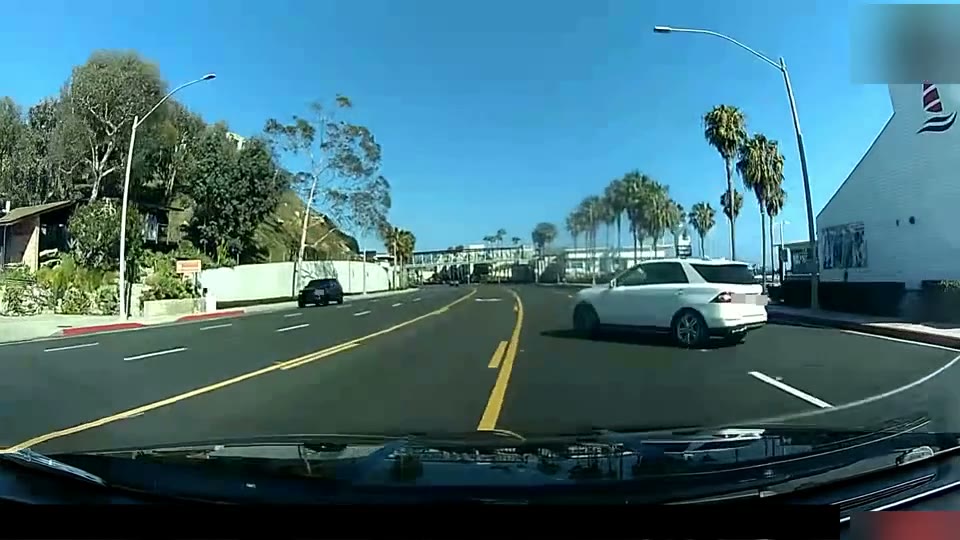
Newport Beach, California. A white sport utility vehicle (SUV) pulls out from the right across the car’s path; the car hits its side at about 43 mph.
Click the chart to jump the video.
- Speed
- 43 mph
- Car reacts
- 4.0 s
- Impact
- 5.6 s, 2.6 g
- After impact
- 35 mph
- Source
- IMU + GPS
More driving samples, free with a short form, on Hugging Face: roaddata-ai/real-driving-events-and-scenarios ↗
One clip, three ways to use it
Teach Cosmos to explain driving video with fine-tune records, then score its own answers against what the sensors measured.
Teach the model to explain the clip
 What happens in this clip, and when?
Show the JSON
{
  "id": "newport-collision-0001",
  "video": "clip.mp4",
  "conversations": [
    {
      "from": "human",
      "value": "<video>\nWhat happens in this clip, and when?"
    },
    {
      "from": "gpt",
      "value": "<think>\nThe car is driving at about 43 mph. A white SUV pulls out from the right and turns across the car's lane.\n</think>\n\nA white SUV pulls out from the right across the car's path. The car hits its side about 5.6 s into the clip."
    }
  ]
}Score any answer against the sensors
- ✓“Yes, it hits an SUV at about 5.5 s.”+1
- ✗“Yes, around 8 s.”0 · wrong time
- ✗“No, the car keeps its lane.”0 · missed it
Show the JSON
{
  "id": "newport-collision-0001",
  "video": "clip.mp4",
  "question": "Does the car collide with anything? If so, when?",
  "answer": {
    "collision": true,
    "impact_s": 5.6
  },
  "measured": {
    "impact_s": 5.6,
    "peak_g": 2.61,
    "speed_before_mph": 43,
    "source": "IMU + GPS"
  }
}Alpamayo takes the front camera and the car’s recent motion and plans the path ahead. Our GPS gives the path the car really drove: the target to learn and the answer to score against.
Each second, Alpamayo 1.5 sees the last moments of this video and 1.6 s of the car’s real motion, then plans the next 6.4 s and says why. The speed gauge and banner burnt into the original video are masked, so the model sees only the road.
“Keep lane since the lane is clear ahead.”
- Its speed in 1.5 s
- 41 mph
- Real speed in 1.5 s
- 37 mph
- Impact
- 5.6 s, 2.6 g
Demo: outputs of NVIDIA Alpamayo 1.5 on our sample clip, shown as-is. They are not part of our data or downloads; Alpamayo is licensed by NVIDIA.
The path the car really drove
Show the JSON
{
  "id": "newport-collision-0001",
  "video": "clip.mp4",
  "t0_s": 3.0,
  "frame": "metres; x forward, y left",
  "rate_hz": 10,
  "source": "GPS 1 Hz, interpolated to 10 Hz",
  "history_xy": [[-29.51, 0.17], [-27.55, 0.16], [-25.58, 0.15], … 10 more …, [-3.94, 0.02], [-1.97, 0.01], [0.0, 0.0]],
  "future_xy": [[1.97, -0.01], [3.94, -0.02], [5.9, -0.03], … 44 more …, [78.74, 4.19], [79.91, 4.35], [81.08, 4.5]]
}Each input comes straight from the clip and its sensors
- Front camera
- the single front-camera view Alpamayo 1.5 accepts
- Ego history
- 1.6 s of the car's real path at 10 Hz
- Future path
- the path the car really drove next: the target to learn
- Benchmarks
- real stops, swerves and collisions to score plans against
Cosmos 3 re-renders the real crash in new weather and light. Drag the line to compare.
Built on NVIDIA Cosmos. Demo: Cosmos 3 Nano re-renders of 1.5–7.3 s of the clip, made on our own graphics processing unit (GPU) from the edges and depth above. Generated video is synthetic, carries NVIDIA’s invisible watermark, and is not part of our data or downloads.
Made from the real clip
Edges and depth hold the street’s layout while a text prompt changes the conditions, so the SUV, the lanes and the impact stay where they were and the clip’s sensor labels hold for every version.
Then put the new versions to work
- 1GenerateSnow, night and rain versions of the real crash, from its edges and depth.
- 2Keep the labelsLayout and timing hold, so the IMU impact (5.6 s, 2.6 g) and the GPS path still apply to every version.
- 3Test or trainRun your planner or perception model on each version, or add them to training.
- 4Score on realJudge the result on real clips the model has never seen.
Same crash, same motion, different weather: Alpamayo 1.5 on each version
| Real | In falling snow | At night | In heavy rain | |
|---|---|---|---|---|
| 4.0 s · SUV pulling out | Keep lane since the lane is clear ahead.43 → 41 mph | Change to the left lane due to a slow/merging white vehicle in the right lane and reduced traction/visibility from snow, then match speed with left-lane traffic after merging.43 → 42 mph | Keep lane since the lane is clear ahead.43 → 40 mph · slows | Keep distance to the cut-in vehicle since it merges into our lane ahead.43 → 45 mph |
| 5.0 s · 0.6 s before impact | Nudge left due to the vehicle merging from the right into our lane.39 → 39 mph | Slow down to yield to the cut-in vehicle from the right since it is merging into our lane ahead.39 → 34 mph · slows | Nudge left due to the vehicle merging from the right into our lane.39 → 39 mph | Slow down and hold lane because a white SUV is merging from the right into our lane directly ahead, requiring us to create space to avoid a collision.39 → 36 mph · slows |
Built on NVIDIA Cosmos. Demo: Alpamayo 1.5 given each video with the car’s real motion up to that moment; speeds are now → its plan 1.5 s ahead. Outputs shown as-is; not part of our data or downloads.
Integration status
Demonstrated means we ran it end to end on our data and the result is shown or downloadable. In development means work is under way. Planned means not started. Versions are the ones we ran.
| Status | Workflow | What we ran | Last run | Where |
|---|---|---|---|---|
| Demonstrated | Cosmos 3 Transfer: snow, night and rain versions of a real clip | Self-hosted Cosmos 3 NIM 2.1.0, our edge and depth control maps | 2026-11-18 | Generated videos on this page |
| Demonstrated | Cosmos Reason fine-tuning records | LLaVA-format pack checked with NVIDIA’s cosmos-reason2 fine-tuning script | 2026-11-18 | Download on this page |
| Demonstrated | Alpamayo 1.5 planning on a real clip | Inference on the public collision sample; outputs shown, not in any download (model licence is non-commercial) | 2026-11-18 | Shown on this page |
| Demonstrated | Isaac Sim crossing twin with a humanoid and a delivery robot | Isaac Sim 5.1.0 container, Unitree H1 and Nova Carter, real crowd replayed | 2026-11-24 | Street robots |
| Demonstrated | GR00T N1.7 fine-tune for the H1 crossing (simulation only) | Trained and evaluated in Isaac Sim; no real-robot runs | 2026-11-24 | Model on Hugging Face ↗ |
| Demonstrated | LeRobot-format robot episodes | H1 street-crossing episodes; loads in the Hugging Face dataset viewer | 2026-11-24 | Dataset |
| In development | NuRec / 3D Gaussian reconstruction of real streets | Camera reconstruction runs; aligning it to the map is not solved yet | — | — |
| Planned | Isaac Lab training and evaluation tasks | Not started | — | — |
| Planned | AlpaSim scenario replay | Not started | — | — |
How to run the demonstrated workflows
Cosmos 3 Transfer: snow, night and rain from a real clip
- Take the clip and its two control maps from this page: clip.mp4, edges.mp4 (edges) and depth.mp4 (depth, from Depth Anything V2 Small).
- Run Cosmos 3 Transfer with both maps as controls. Our run: the self-hosted NIM container
nvcr.io/nim/nvidia/cosmos3:2.1.0(model nvidia/cosmos3-nano) on one A100 40 GB with BF16 layer offload; 480p 16:9, 30 steps, 16 frames per second, 93 frames; control guidance 3.0, edge weight 1.0 (medium), depth weight 1.0. - The three prompts we used are in gen.json. About 3 minutes per clip on that GPU.
Cosmos Reason fine-tuning records
- Download cosmos-reason-sft-llava.zip and unzip it:
annotations.json(LLaVA format),media/andllava_sft.toml. - In NVIDIA’s cosmos-reason2 repository, use
examples/cosmos_rl/scripts/llava_sft.pywith the toml; setannotation_pathandmedia_pathto where you unzipped the pack. - For video-only records, change
for i, image in enumerate(images):tofor i, image in enumerate(images or []):in that script. As published it assumes every record has an image; we found this when checking the pack.
Alpamayo 1.5 planning on a real clip
We show Alpamayo 1.5’s plans on this page, but do not ship them in any download: the model’s licence is non-commercial. The inputs it needs from a clip (16 points of past path, camera frames) are in records.json.
Isaac Sim crossing twin with a humanoid or delivery robot
- Get the crossing pack: street-robots-crossing-twin (humanoid or delivery-robot folder).
- Run a route in the Isaac Sim 5.1.0 container (from the pack and the Street Crossing Challenge README):
docker run --gpus all --rm -e ACCEPT_EULA=Y -e PRIVACY_CONSENT=N -v "$PWD":/pack -e YIELD_M=0 \
  -e ROBOT=delivery -e CONTROLLER=/pack/my_controller.py -e HID=335 -e T_LEAD=3 -e T1=25.7 \
  nvcr.io/nvidia/isaac-sim:5.1.0 bash /pack/runner/run_isaac.sh
- Route settings (
T_LEAD,T1) are in the pack’sroutes/routes.json; score a run with the pack’s scorer or enter the Street Crossing Challenge.
GR00T N1.7 fine-tune for the H1 crossing (simulation only)
- Install NVIDIA’s Isaac-GR00T code (github.com/NVIDIA/Isaac-GR00T); one GPU.
- Load the model from Hugging Face, as on its model card:
from gr00t.policy import Gr00tPolicy from gr00t.data.embodiment_tags import EmbodimentTag policy = Gr00tPolicy(model_path="roaddata-ai/gr00t-n1.7-h1-street-crossing", embodiment_tag=EmbodimentTag.NEW_EMBODIMENT, device="cuda:0", strict=True) - Inputs: a 448 x 252 RGB head-camera frame and a 25-value state (route 20, speed 1, goal 2, pace 2); the model card has the full example and the modality config. Results are from simulation only.
LeRobot-format robot episodes
Read an episode with 05_lerobot_episode.py or the notebook (tested with pyarrow 18.1.0), or load the dataset with the LeRobot library (v2.1 format).
What you can rely on
Building on Cosmos or Alpamayo? Tell us the scenarios you want to fine-tune or test.